Guide · WooCommerce
How to reduce WooCommerce cart abandonment without pop-ups
Most people who add something to a cart don't buy it. You can't change that completely, but you can stop losing the ones who were close. This guide covers three layers, in the order they pay off: fix what pushes shoppers away, call back the ones who only switched tabs, and follow up with the ones who really left. None of it needs a pop-up.
How many carts get abandoned, and why
The Baymard Institute keeps a running average of published cart abandonment studies. At the time of writing it stands at 70.22%, across 50 studies: roughly seven out of ten carts are never paid for.
A large part of that is simply people browsing, saving items for later or comparing prices. But Baymard also asks shoppers who did intend to buy why they left during checkout. The top answers:
| Reason for leaving during checkout | Shoppers |
|---|---|
| Extra costs too high (shipping, tax, fees) | 40% |
| Delivery was too slow | 20% |
| Didn't trust the site with their card details | 19% |
| The site wanted them to create an account | 18% |
| Checkout too long or complicated | 17% |
| Couldn't see or calculate the total cost up front | 12% |
Source: Baymard Institute, Cart Abandonment Rate statistics (figures as published on October 27, 2026; shoppers could choose more than one reason).
Two things stand out. First, many of these reasons are fixable in your store's settings. Second, none of them is solved by interrupting the shopper. That's the logic behind the three layers below.
Layer 1: fix the reasons shoppers leave
Recovery tools work on the carts you already lost. Fixing the checkout means losing fewer in the first place, so start here.
Show the full cost early
Surprise costs are the number one reason in the table. Let shoppers see shipping before they reach the payment step: set up your shipping zones and rates in WooCommerce → Settings → Shipping, and make sure the cart page shows a shipping estimate (the Cart block does this when shipping is configured). If you offer free shipping above a certain amount, say so on the cart page, not only on the home page.
Let people buy without an account
Go to WooCommerce → Settings → Accounts & Privacy and allow customers to place orders without an account (guest checkout). You can still offer to create an account after the order, when it no longer stands between the shopper and the purchase.
Make checkout short and trustworthy
- Remove fields you don't need. Every extra field is one more reason to stop.
- Offer the payment methods your customers expect. A shopper who can't find their usual one often doesn't come back.
- Keep your returns policy and contact details one click away from the cart and checkout.
- Use HTTPS everywhere and test the full checkout yourself, on a phone, every time you update plugins.
Layer 2: call back shoppers who switch tabs
A lot of abandonment isn't a decision. The shopper opens another tab to compare a price, check their bank or answer a message, and your store simply drops out of sight. They haven't left yet: your tab is still open, a few centimetres away.
That's the moment a tab title notification works. When the browser reports that your store's tab is no longer visible, its title changes to a short message, such as "You left $135.00 behind!", so it catches the shopper's eye in the tab bar. When they come back, the title returns to normal. No window opens, nothing covers the page and you don't need their email address, so it also reaches guest shoppers.
30-second demo, recorded on a demo WooCommerce store. The video loads from YouTube only when you press play.
Set it up for free in five minutes
TabPulse is the plugin we make for this. The free version on WordPress.org does the tab messages with no limits:
- In WordPress, go to Plugins → Add New Plugin, search for TabPulse, then click Install Now and Activate. WooCommerce must be active.
- Open Settings → TabPulse.
- Write two or three messages. Use
{cart_total}to insert the real cart value. - Choose how fast the messages rotate (1, 2, 2.5, 3 or 5 seconds) and save.
- Test it: add a product to your cart, open the cart page, then switch to another tab and watch your store's tab.
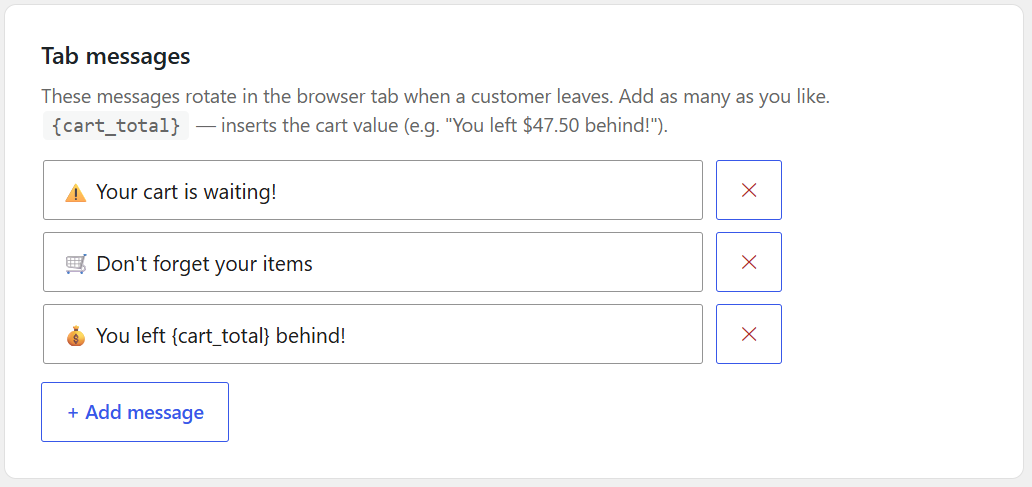
{cart_total} becomes the shopper's real cart value.The script loads only on the cart and checkout pages, doesn't use jQuery or cookies and stores no personal data. It makes one small request to your server when a shopper comes back, to count the return.
Write messages that work
- Lead with the important words. With several tabs open, the browser shows only the beginning of each title.
- Start with an emoji (🛒, ⚠️, 💰): it stands out in a row of plain titles.
- Use the real amount. "You left $135.00 behind!" is more concrete than "Come back!".
- Only promise what exists. Don't write "10% off" unless the shopper really gets that discount when they return.
Give returning shoppers a reason to finish (Pro)
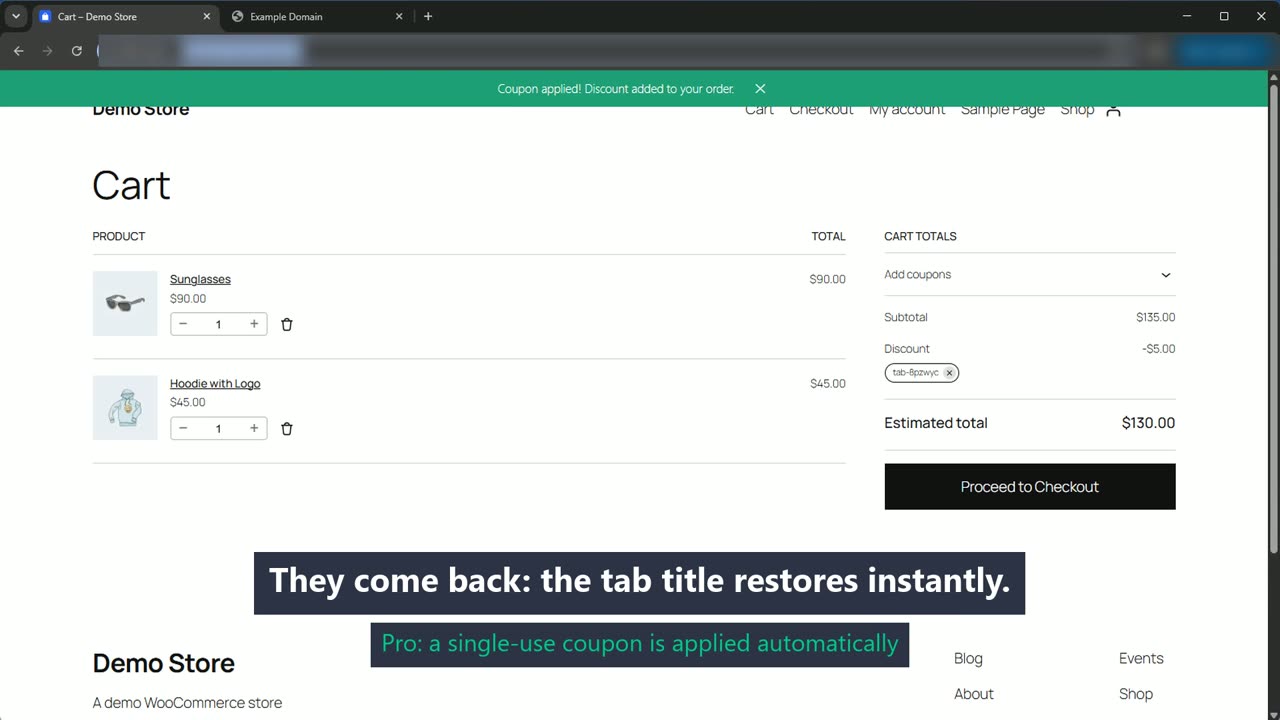
TabPulse Pro adds a red badge on your store's favicon while the shopper is away and, when they come back, can apply a single-use coupon automatically: a fixed discount you choose, valid for one use and 24 hours, with a green "Coupon applied!" confirmation. Built-in limits stop abuse: a daily cap, one discount per email address every 30 days, an optional one coupon per connection, and an alert if something looks wrong.
Layer 3: follow up with the ones who left
Some shoppers close the tab or the browser. For them, an abandoned cart email plugin is the right tool: it sends a reminder an hour or a day later. It needs an email address, though. A shopper who left from the cart page, before typing anything at checkout, usually hasn't given you one.
That's why the layers complement each other rather than compete. The tab message works in the first minutes, while the shopper is still in the browser and needs no email. The email works hours later, for shoppers whose address you have. TabPulse sends no emails, so it can run alongside the abandoned cart email plugin you already use.
Why not pop-ups?
Exit-intent pop-ups try to stop people at the door: when the mouse moves toward the top of the window, a box appears with an offer. They can recover some carts, but they have costs:
- They interrupt. They cover the page at the moment the shopper is deciding, which some people find pushy.
- They guess on phones. Exit-intent watches the mouse cursor. Phones don't have one, so mobile versions rely on timers or scroll direction instead.
- They get one chance. A shopper who switches tabs with a keyboard shortcut never triggers them, and one who closes the pop-up and leaves anyway usually gets no second reminder.
A tab message does the opposite: it does nothing while the shopper is on your page, and only speaks up once they've looked away.
Measure what you recover
Whatever you change, compare before and after over at least a couple of weeks. WooCommerce's own reports (WooCommerce → Analytics) give you orders and revenue. TabPulse adds its own numbers:
- Free: a counter of how many shoppers came back to their cart this week and this month.
- Pro: a Recovered revenue report for the last 30 days and the current month. It shows two separate figures that are never added together: orders that used a TabPulse coupon (certain), and orders from shoppers who came back and bought (probable). Both are counted after refunds.
Try it on your store. The free version is on WordPress.org. Pro is $79 per year for one site, with a 14-day free trial and no credit card.
FAQ
Does a tab title notification work on phones?
Mobile browsers mostly hide tab titles, so the effect is aimed at desktop shoppers, who often have many tabs open. On phones it simply stays out of the way. It doesn't break anything or show anything extra.
Will it slow down my store?
TabPulse loads only on the cart and checkout pages. The free engine is about 5 KB (1.5 KB compressed) and doesn't use jQuery. With Pro's coupons turned on, there is one extra request when the shopper leaves.
Does it work with the Cart and Checkout blocks?
Yes, it works with both the block-based Cart and Checkout and the classic shortcodes.
Is it GDPR-friendly?
The free version sets no cookies and stores no personal data, only a count of returns. Pro's coupon feature stores the attribution on the order and a one-way hash of the email address to enforce the "one discount per email" limit.