Guide · WooCommerce
Browser tab notifications for WooCommerce: how they work and how to set them up
A shopper has items in your cart, opens another tab "just to check something", and forgets about you. A browser tab notification changes your store's tab title while they're gone, so your tab stands out in their tab bar instead of fading into it. This guide explains how it works, how it differs from push notifications, and how to set one up on WooCommerce in a few minutes.
What a browser tab notification is
Every browser tab shows two things: a small icon (the favicon) and the page title. Normally your cart tab says something like "Cart – Your Store". With a tab notification, the moment the shopper switches to another tab, that title changes to a message of your choice, for example "🛒 Don't forget your items" or "💰 You left $135.00 behind!". Several messages can rotate every few seconds. When the shopper clicks back, the original title returns.

It's a quiet reminder: nothing opens and nothing covers a page. It only works on someone who still has your tab open, which is exactly the shopper who was close to buying.
Tab notifications vs. push notifications
"Browser notification" usually means push notifications: the pop-up messages a site can send to your desktop or phone after you click "Allow". They're a different tool:
| Tab notification | Push notification | |
|---|---|---|
| Permission prompt | None | The shopper must click "Allow" first |
| Who it reaches | Anyone with your cart tab still open | Only shoppers who subscribed |
| When | While the shopper is in another tab | Any time, even after they close the site |
| Where it appears | Your own tab title (and favicon) | The operating system's notification area |
| Needs an email or account | No | No, but needs the subscription |
They don't compete. Push and email reach people after they've left; a tab notification works in the minutes before that, on shoppers who never gave you anything, including guests.
How it works under the hood
Browsers tell a page when it becomes hidden or visible through the Page Visibility API (the visibilitychange event), supported by all modern browsers. A tab notification script listens for that event:
- When the page loads, the script remembers its original title.
- The shopper switches tabs, so the page becomes hidden. The script starts rotating your messages in the title with a timer.
- Placeholders like the cart total are filled in with the shopper's real values.
- The shopper comes back, so the page becomes visible. The timer stops and the original title is restored.
No polling is involved: the browser announces the change. In TabPulse the script only loads on the cart and checkout pages, weighs about 1.5 KB compressed and doesn't need jQuery. It makes one small request to your server when the shopper comes back, to count the return.
Set one up on WooCommerce (free)
TabPulse is the plugin we make for this, and the free version on WordPress.org has no message limits.
- In WordPress, go to Plugins → Add New Plugin, search for TabPulse, then click Install Now and Activate. WooCommerce must be active.
- Open Settings → TabPulse.
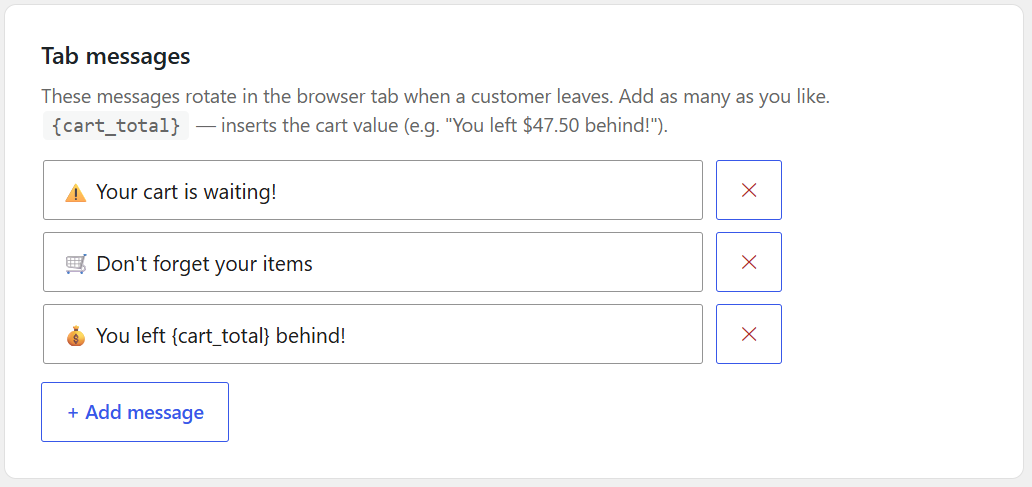
- Write your messages (as many as you like). Add
{cart_total}where you want the cart value. - Pick the rotation speed: 1, 2, 2.5, 3 or 5 seconds between messages. 2.5 seconds is the default.
- Save, then test: add a product to your cart, open the cart page and switch to another tab.
30-second demo on a demo WooCommerce store. The video loads from YouTube only when you press play.
Messages that bring shoppers back
- Put the key words first. With many tabs open, each title is cut to its first few words.
- Open with an emoji. 🛒, ⚠️ or 💰 stand out in a row of plain titles.
- Use the real cart total. "You left $135.00 behind!" is more concrete than "Come back!".
- Two or three messages are enough. They rotate, so each one gets seen.
- Don't rotate too fast. A message that changes every second is hard to read; 2 to 3 seconds works well.
- Only promise what's real. Mention a discount only if the shopper actually gets one when they return.
Some examples to start with:
- ⚠️ Your cart is waiting!
- 🛒 Don't forget your items
- 💰 You left {cart_total} behind!
Going further with Pro
TabPulse Pro adds the red badge on your favicon while the shopper is away, rotation speeds up to 10 seconds, and, when the shopper comes back, an optional single-use coupon applied automatically (a fixed discount you choose, valid for 24 hours, with limits against abuse). A Recovered revenue report shows the orders that used a TabPulse coupon and, separately, the orders from shoppers who came back and bought.
What it can't do
- It needs the tab to stay open. If the shopper closes the tab or the browser, there's nothing to change. That's what abandoned-cart emails are for.
- It's mostly a desktop tool. Mobile browsers hide tab titles most of the time, so phone shoppers rarely see it. On mobile it simply stays out of the way.
- It works where it's loaded. TabPulse runs on the cart and checkout pages, where the intent to buy is highest, not on product or category pages.
Try it on your store. The free version is on WordPress.org. Pro is $79 per year for one site, with a 14-day free trial and no credit card.
FAQ
Does it work in Chrome, Firefox, Safari and Edge?
Yes. All of them support the Page Visibility API that tab notifications rely on.
Does changing the title affect my SEO?
No. The title only changes in the shopper's own browser, after the page has loaded and only while the tab is hidden. Your page's real title in the HTML stays the same.
Does it ask shoppers for permission?
No. Unlike push notifications, there's no prompt and nothing to subscribe to.
Does it work with the Cart and Checkout blocks?
Yes, with both the block-based Cart and Checkout and the classic ones.
Does it store personal data?
The free version sets no cookies and stores no personal data, only a count of returns.